


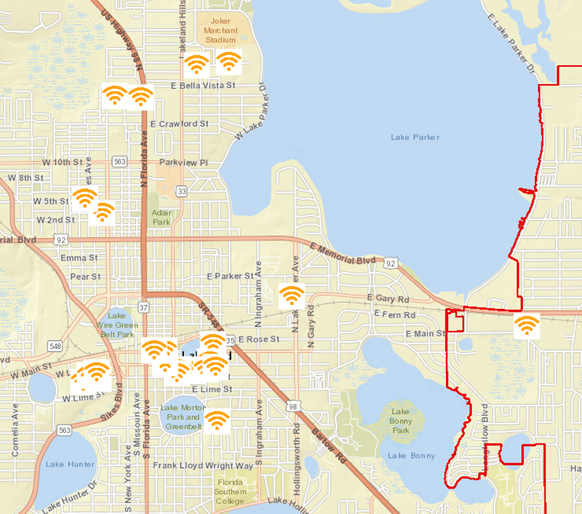
The City of Lakeland (“City”) owns and maintains a Wi-Fi communications network, (referred to as “SurfLakeland”), which it makes available as a free service for use by the public. The following Terms and Conditions of Use apply to all users of the City’s SurfLakeland Network.
- Acceptance of the Terms and Conditions of Use. By using the City’s SurfLakeland Network, you acknowledge that you accept, without limitation or qualification, to be bound by, and comply with, these Terms and Conditions of Use and any other posted guidelines or rules, as may be amended from time to time. If you do not accept these Terms and Conditions of Use, you are not authorized and shall not use the City’s SurfLakeland Network. Please take the time to read these Terms and Conditions of Use carefully.
- Security and Privacy. The network access you are using is not private or secure. Any person within range of a wireless access point can intercept data in transit over the wireless network. From time to time you may decide to access third-party Internet sites or order products or services from third parties when you access the Internet. The City strongly recommends that you do not use this SurfLakeland Network for the transfer of sensitive data, such as credit card data or bank account data, even while using encryption. You agree that you are solely responsible for the security of your sensitive data, including credit card and similar information, from misuse including such as unwanted charges or other unauthorized use. You agree to hold the City, its agents and contractors harmless in the event that your credit cards, bank account numbers, social security number, account information, your identity, or any of your personal information is compromised or utilized by a third party. No technical support will be provider to users of the Service.
The City reserves the right, but has no obligation, to monitor compliance with and investigate violations of these Terms and Conditions of Use, including but not limited to monitoring bandwidth usage and publicly posted content, performing audits of the City’s SurfLakeland Network, including scanning equipment connected to the City’s SurfLakeland Network for security issues, and examining material on the City’s servers and the City’s SurfLakeland Network.
- Suspension; Termination. In its sole discretion and with or without notice to you, the City reserves the right to suspend or terminate your use of the City’s SurfLakeland Network if you engage in any illegal use of the City’s SurfLakeland Network, or any use in contravention of these Terms and Conditions of Use. Additionally, the City reserves the right to suspend or terminate your use of its SurfLakeland Network in order to prevent or minimize harm to the City’s SurfLakeland Network, or prevent or minimize disruption of the performance of the City’s SurfLakeland Network.
- Force Majeure. The City shall be excused from performance hereunder and shall not be liable for damages or otherwise, if and to the extent that the City is unable to perform due to any act, event, cause or condition that is beyond its reasonable control, including but not limited to accidents, acts of God, acts of any government, failure of third-party communications networks, war, terrorist activity, industrial or labor disputes, fire, flood, explosion, civil disorder, power failure, equipment failure, acts of civil or military authorities, theft, vandalism, misuse, insurrection, inability to obtain necessary supplies, and the like. The City will not notify you in the event of such occurrence.
- Your Obligations.
- Responsibility for Use. Use of the City’s SurfLakeland Network is subject to compliance with these Terms and Conditions of Use. You agree that you will not use the City’s SurfLakeland Network for any conduct that violates any local, state, or federal laws or regulations.
- Use by minors. Use of the City’s SurfLakeland Network is limited to users who are at least eighteen (18) years of age or who have the consent of a parent or guardian. Use of the City’s SurfLakeland Network constitutes a representation of the required age or consent, and agreement that City may rely on that representation. You agree that you are responsible for such use, and the City strongly recommends that any use of the City’s SurfLakeland Network by a minor be conducted only under the supervision of a responsible adult. Certain material available on the Internet may not be appropriate for minors. The City is not responsible for the content of or exposure to the information and material available through the Internet. The City makes no representations or warranties and gives no guarantees as to the quality, suitability, truth, accuracy or completeness of any information or materials contained on the Internet. Any questions regarding any such information or materials should be directed to the providers of such information or materials.
- Assignment or sharing of City’s SurfLakeland Network Access. You agree that you shall not use the City’s SurfLakeland Network as an Internet Service Provider ("ISP"). You agree that you shall not resell, share, give away, redistribute, sublicense or otherwise distribute the City’s SurfLakeland Network service or any portion thereof to any third party in any manner. For example, but without limitation, you may not provide Internet access to others through your connection, host shell accounts, or provide e-mail or news services to others.
- Local networking. The City’s SurfLakeland Network is intended to support the connection of the City’s SurfLakeland Network to a single computer. The City’s SurfLakeland Network does not allow the setup, configuration and equipment maintenance of devices, including multifunction devices, that may contain a switch, router, firewall, etc. that connect multiple computers. You agree that you shall not operate a server of any type that provides services to other users or for your own use over the City’s Surf Lakeland Network. You understand and agree that the City has the right to monitor the City’s SurfLakeland Network and, to the extent necessary, your computer system to ensure that you are not providing any such services via your connection. You understand and agree that the City has the right to take any measures it deems necessary in its sole discretion to prevent the use of the City’s SurfLakeland Network for uses other than those prescribed in these Terms and Conditions of Use.
- Your Warranties, Representations and Indemnifications.
- Warranties and Representations. You warrant and represent that: You are at least eighteen (18) years of age or have the consent of a parent or guardian to use this network; You will use the City’s Surf Lakeland Network only in accordance with these Terms and Conditions of Use; You will take reasonable measures to protect your personal information.
- Indemnification. You agree to indemnify, hold harmless, and, at the sole election of the City, defend or pay for an attorney selected by the City to defend the City, its officers, agents, contractors, servants and employees (collectively, "City Indemnified Entities"), at all times hereafter, from and against any claims, demands, causes of action, losses, liabilities, or expenditures of any kind or nature, including all costs, expenses, and attorneys’ fees, arising out of, accruing, or resulting from your use of the City’s SurfLakeland Network. The above indemnifications shall survive the expiration or termination of this agreement.
- Disclaimers and Limitation of the City of Lakeland’s Liability.
- YOU UNDERSTAND AND AGREE THAT THE CITY’S SURFLAKELAND NETWORK SERVICE AND EQUIPMENT PROVIDED BY THE CITY ARE NOT GUARANTEED TO BE ERROR FREE, UNINTERRUPTED, SECURE, ALWAYS AVAILABLE OR AVAILABLE WITH SUFFICIENT CAPACITY. YOU UNDERSTAND AND AGREE THAT THE USE OF THE CITY’S SURFLAKELAND NETWORK SERVICE, THE INTERNET, AND ANY EQUIPMENT PROVIDED BY THE CITY IS USED AT YOUR SOLE RISK. YOU UNDERSTAND AND AGREE THAT ANY AND ALL OF CITY’S SURFLAKELAND NETWORK SERVICES ARE PROVIDED "AS IS, AS AVAILABLE, AND WITH ALL FAULTS," WITHOUT WARRANTIES OF ANY KIND, EITHER EXPRESSED OR IMPLIED, INCLUDING WITHOUT LIMITATION, WARRANTIES OF TITLE, NONINFRINGEMENT, MERCHANTABILITY, OR FITNESS FOR A PARTICULAR PURPOSE, OTHER THAN WARRANTIES THAT CANNOT LEGALLY BE DISCLAIMED.
THE CITY MAKES NO WARRANTY THAT THE CITY’S SURFLAKELAND NETWORK WILL WORK ON YOUR COMPUTER SYSTEM. YOU UNDERSTAND AND AGREE THAT THE CITY HAS NO RESPONSIBILITY FOR DAMAGE OR DESTRUCTION TO YOUR COMPUTER OR COMPUTER SYSTEM, OR THE DATA, FILES OR INFORMATION STORED ON YOUR COMPUTER OR COMPUTER SYSTEM. YOU UNDERSTAND AND AGREE THAT THE CITY HAS NO RESPONSIBILITY FOR ANY THIRD-PARTY CONTENT, DATA, INFORMATION, PROGRAMS OR OTHER MATERIAL THAT YOU MAY USE OR ACCESS USING THE CITY’S NETWORK. YOU UNDERSTAND AND AGREE THAT IT IS SOLELY YOUR RESPONSIBILITY TO EVALUATE THE ACCURACY, COMPLETENESS AND USEFULNESS OF ALL OPINIONS, ADVICE, SERVICES, MERCHANDISE AND OTHER INFORMATION PROVIDED THROUGH THE CITY’S SURFLAKELAND NETWORK OR ON THE INTERNET.
- Third-Party Services, Products and Content.
- Unauthorized Access. The City’s SurfLakeland Network is a shared network and is used by many users to access a variety of services. Neither the City’s SurfLakeland Network nor the Internet provides security against unauthorized access. Others may be able to access or monitor your activity and conduct while you are using the City’s SurfLakeland Network. The City is not responsible for any unauthorized access to the data, files, transmissions, communications sent to or from you or for unauthorized access to your computer. You understand and agree that you are solely responsible for the security of any computer or other device(s) with which you connect to the City’s SurfLakeland Network, and any data, programs or information stored on such devices. You are responsible for taking measures to ensure the security of your computer system(s) to prevent unauthorized access to it by others.
- Viruses and Spyware. You understand and agree that the City is not responsible for any virus or spyware that gains access to your computer over the City’s SurfLakeland Network or any damage resulting therefrom. You are solely responsible for taking measures to prevent infection of your computer from viruses and spyware, including installing and maintaining up-to-date anti-virus and anti-spyware software on your computer. In the event that your computer becomes infected with any virus that, in the City’s sole discretion, may harm the City’s SurfLakeland Network or disrupt the performance of the City’s Surf Lakeland Network for other users, the City may immediately suspend or terminate access by you to the City’s SurfLakeland Network with or without notice to you.
- You understand and acknowledge that some third party Internet services may contain material that may be deemed to be profane, indecent, disturbing, abusive, or offensive and may contain other material you may find problematic. YOU UNDERSTAND AND AGREE THAT THE CITY IS NOT RESPONSIBLE FOR ANY SUCH CONTENT.
- Third-party services, products and content provided by others. You understand and agree that while the City’s SurfLakeland Network supplies access to the Internet, the City is not responsible for the services or products offered by others on the Internet, nor is the City the publisher of any information on the Internet that is provided by others. The City makes no commitment to review, monitor or filter and does not endorse or otherwise vouch for any service, product, information, programs, data, or content sent, accessed, offered or advertised over the Internet or otherwise made available to you by any individual, information provider, or on-line service or content provider. Such content may include profane, obscene, indecent, disturbing, illegal, abusive, infringing, offensive or other material you may find problematic. YOU UNDERSTAND AND AGREE THAT THE CITY IS NOT RESPONSIBLE FOR ANY SUCH CONTENT.
- Term and Termination. In its sole discretion, the City reserves all rights to suspend or terminate these Terms and Conditions of Use and to disconnect the City’s SurfLakeland Network, in whole or in part, at any time, with or without cause and with prior notice to you.
- Governing Law. These Terms and Conditions of Use shall be interpreted and construed in accordance with and governed by the laws of the State of Florida. Use of the City’s SurfLakeland Network constitutes your consent to personal jurisdiction in Polk County, Florida for any controversy or lawsuit arising out of or resulting from use of the City’s SurfLakeland Network. The exclusive venue for any claim or lawsuit arising from your use of the City’s SurfLakeland Network or these Terms and Conditions of Use shall be the state courts of Polk County, Florida